Project Workspace
with clear approvals

Same contract-driven workflow, hosted and run by RushApp.

No access to source code. Your data stays isolated.

Isolation Approvals Locked history Reports Operations
Access request, not a quote.

Why shared workspaces lose control

System response
Chats and spreadsheets as a workspace
→ One workspace with clear approvals
Unclear responsibility
→ Explicit acceptance + owner review
Changes without control
→ Locked after approval, new stage required
Core rule
Work starts only after scope and acceptance criteria are agreed.

You pay for approved outputs, not time

When work is managed through chats and spreadsheets, it becomes unclear what is approved, what is pending, and what counts as done.

A private workspace runs one fixed scope at a time: clear boundaries, explicit acceptance, locked history, and clear responsibility.

Contract-driven execution

One workspace for the whole project: approvals, locked history, and acceptance. Chats and side docs are not the source of truth.

Single workspace
One project space keeps stages, approvals, decisions, and results together.
Explicit acceptance
Nothing is considered done until it is approved and recorded.
Locked history
After approval, the history becomes read-only. Changes require a new stage.
Responsibility is visible
Responsibility is explicit: who approved, what was accepted, and when.

Approved outputs with locked history

Each stage ends with a concrete output you review and approve. Status is tracked by acceptance, not by calls, time, or informal updates.

After approval, the baseline is read-only. Changes require a new stage.

Step 01

Scope is fixed

Boundary

Before execution starts, we define what is included, what is excluded, and what counts as accepted.

Deliverables list
Acceptance rules
Change limits
Step 02

Decisions are recorded

Record

Key decisions are written down so later work cannot quietly change their meaning.

Constraints
Decisions
Reasoning
Step 03

Outputs are produced

Output

You receive concrete outputs to review, depending on the scope and stage.

Stage result
Acceptance checklist
Reference materials
Step 04

Result is approved and locked

Reference

Once approved, the output becomes the fixed reference for all next work inside the workspace.

Approval record
Final snapshot
Locked baseline

What your team sees

Approved / Pending / Locked — one workspace with clear statuses, read-only history, and generated report snapshots.

Read-only after approval
Proof 01

Approved / Pending / Locked is explicit

In progress

If a stage is not approved, it stays pending. Acceptance is visible and unambiguous.

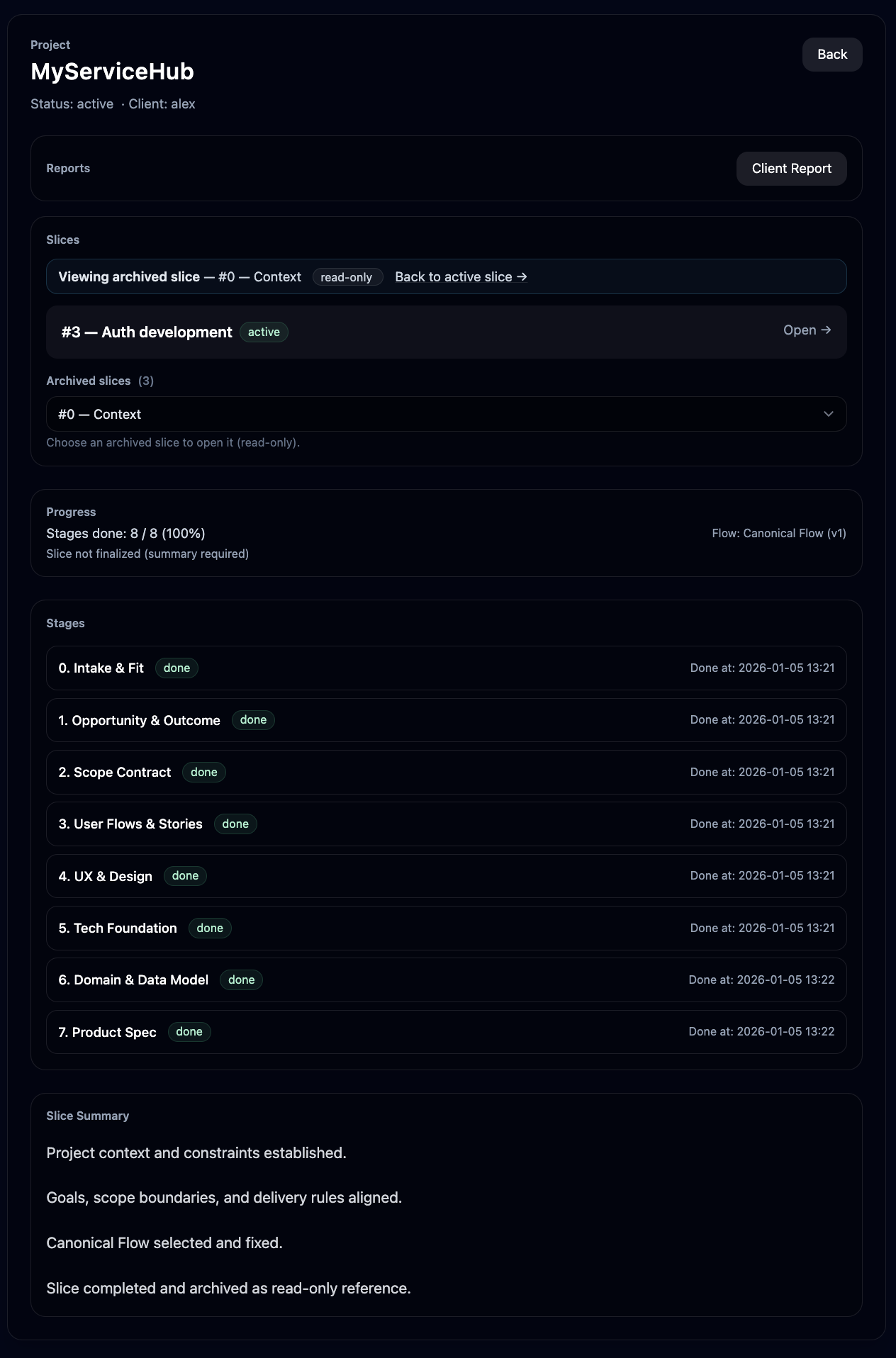
Stage view with approval states
pending active read-only
Pending means not approved yet.
Acceptance is recorded and visible.
Proof 02

Read-only history after approval

Completed

When a stage is completed, the result is locked and summarized as the baseline.

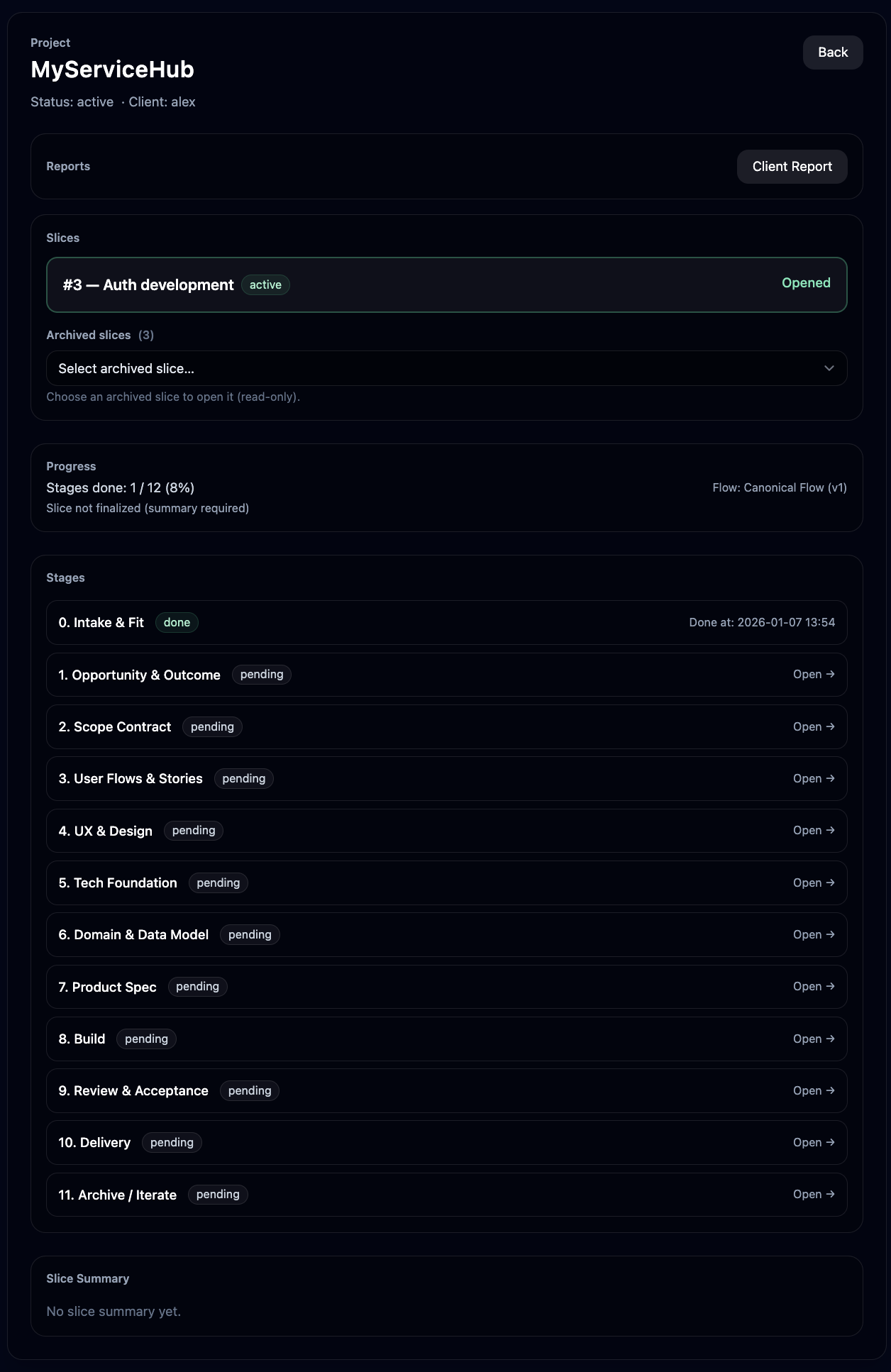
Completed stage with locked baseline
done 100% read-only
Clear done state.
Summary preserves decisions.
Proof 03

Artifacts are readable, history is locked

Read-only

You can view artifacts and stage outputs. Approved history cannot be changed.

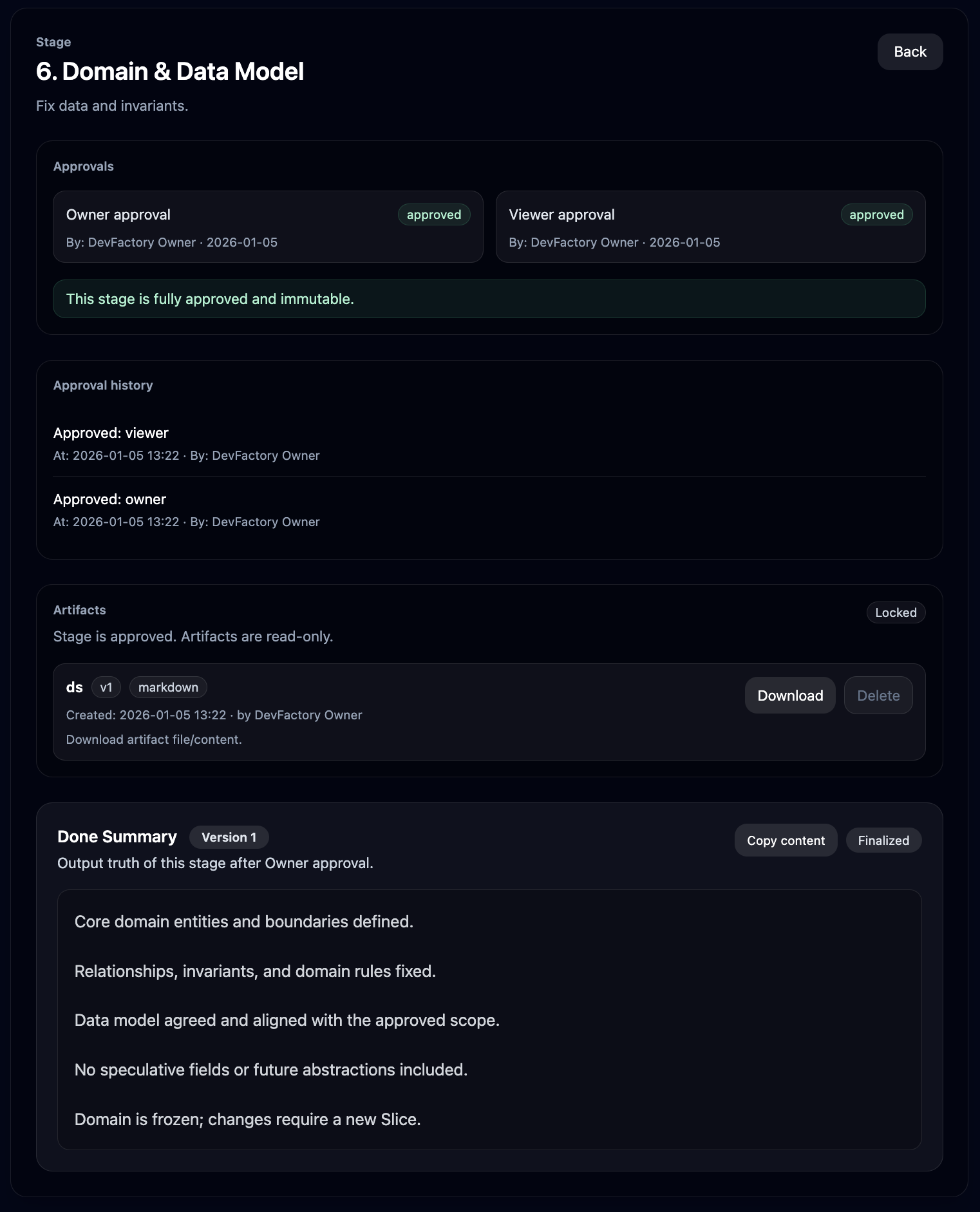
Read-only artifacts and stage outputs
locked read-only approved
Access is controlled by the workspace.
Changes require a new stage.
Proof 04

Generated report snapshot

Report

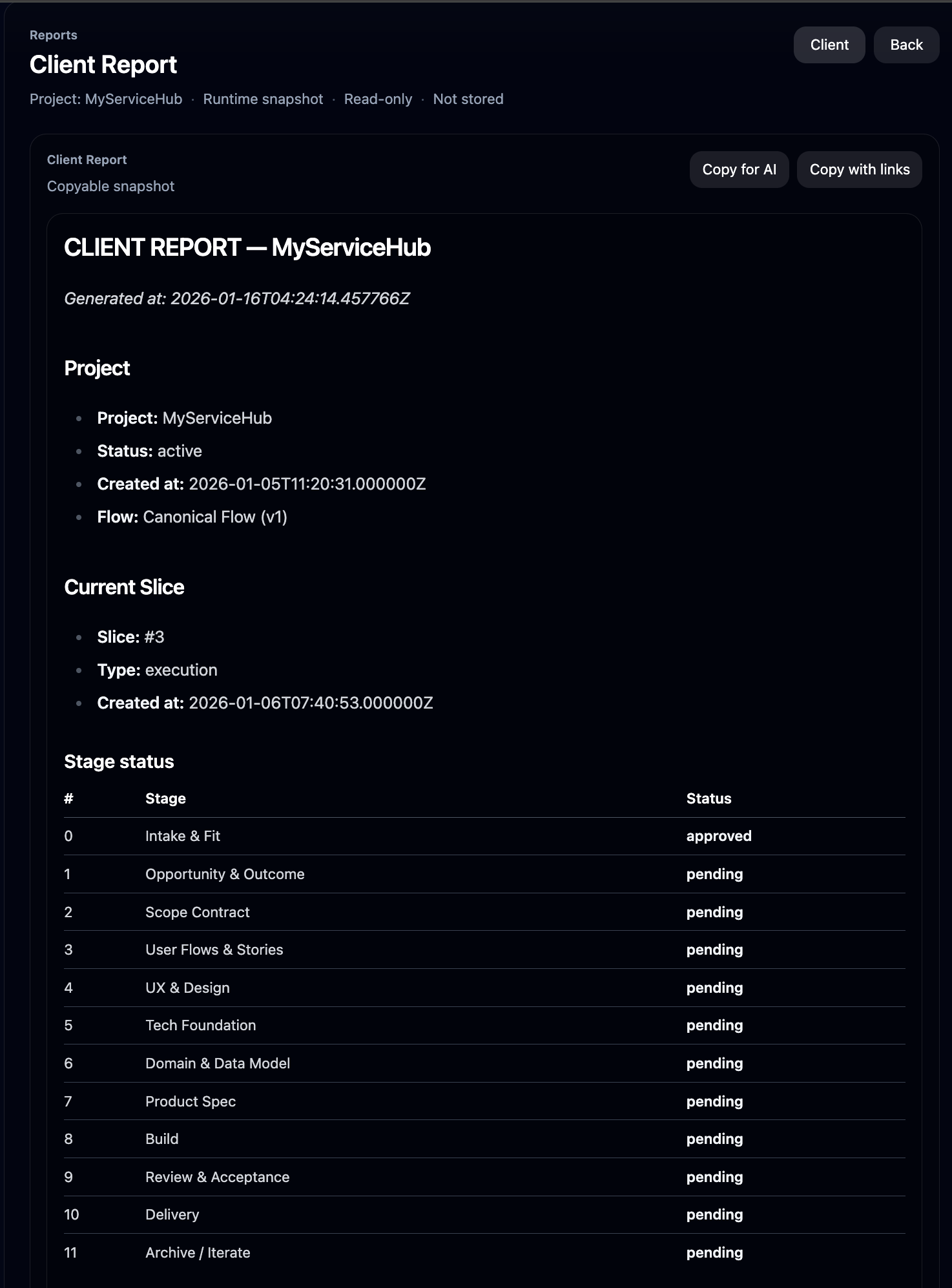
The report reflects current stage statuses and accepted outputs. No manual status writing.

Report snapshot from the workspace
snapshot read-only copy
Generated from current status.
Same data, same report.

Guarantees that reduce delivery risk

These guarantees are enforced by the workflow, not by informal promises.

No silent changes
Once approved, outputs are locked. Any change requires a new stage and explicit approval.
No scope creep
Each scope has clear boundaries. Extra work means a new scope and a new acceptance point.
No invisible progress
Progress exists only as accepted outputs and explicit completion records.
No lost context
Decisions and accepted outputs remain available as read-only history.

Private workspace is run by RushApp

Hosted and maintained by RushApp as an isolated environment with controlled access and locked history rules.

  • No source code access — You get access to the workspace, approvals, artifacts, and reports. Source code is not provided.
  • Isolation per workspace — Each workspace is separated so data and history stay isolated.

Questions before you request access

Answers based on what the workspace provides: approval states, locked history, and controlled access.

Do we get source code access?

No. You get access to a private workspace with stages, approvals, artifacts, and reports. No source code access.

Where is it hosted?

Hosted and run by RushApp in an isolated environment. Access is controlled per workspace.

Is data isolated?

Yes. Data and history are isolated per workspace.

What does “read-only after approval” mean?

Once approved, outputs become the locked baseline. Changes require a new stage and explicit approval.

What is included in pricing tiers?

Access to the workspace, approvals, locked history, artifacts, and generated reports. Exact limits depend on the selected tier.

Is this a task tracker or project board?

No. This is a controlled workspace for contract-driven delivery with explicit acceptance and locked history.

Can we invite our team?

Yes. Your team can be granted access to the workspace with controlled permissions.

What is intentionally not included?

Time tracking, task boards, chat systems, timelines, and automation dashboards.

What happens if we need changes after approval?

A change becomes a new stage. Approved outputs remain as locked history.

Project Workspace pricing

First month free

Three tiers. Same contract-driven model. Hosted and run by RushApp. No source code access.

€99 / month

Private workspace

First month free
  • Isolated environment
  • Private domain
  • Contract execution system
  • No source code access
  • No support

€199 / month

System support

First month free
  • Everything from €99
  • Email support
  • System updates
  • Backups
  • No source code access

€299 / month

Expert involvement

First month free
  • Everything from €199
  • Onboarding call
  • Help with flows and stages
  • Ongoing guidance
  • No source code access